klblk писал(а):Если я правильно понял вопрос по ActionBar:
[syntax=java]LayoutInflater vi = (LayoutInflater) getSystemService(Context.LAYOUT_INFLATER_SERVICE);
View titleView = vi.inflate(R.layout.title, null);
getSupportActionBar().setDisplayOptions(ActionBar.DISPLAY_SHOW_CUSTOM + ActionBar.DISPLAY_SHOW_HOME);
getSupportActionBar().setCustomView(titleView);
getSupportActionBar().setDisplayHomeAsUpEnabled(true);[/syntax]
Если не используется Sherlock или support lib v7 то использовать getActionBar() вместо getSupportActionBar().
А по поводу кнопок: "xml в студию" =)
ОК, Попробовал сделать так, как вы сказали, вот, что получилось:
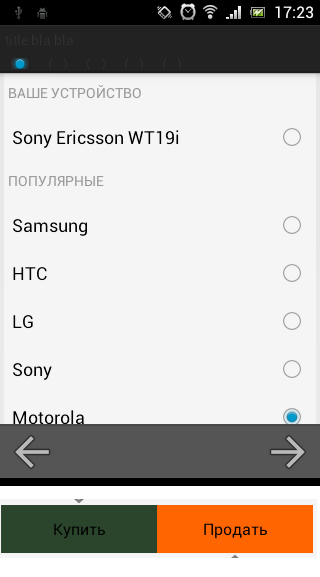
- device-2014-01-13-172354.png (29.11 КБ) 3562 просмотра
Тут также показаны те самые кнопки.
Код OncreateOptionsMenu:
Код: Выделить всё
            getMenuInflater().inflate(R.menu.menu_btnback_btnforward, menu);
	    LayoutInflater vi = (LayoutInflater) getSystemService(Context.LAYOUT_INFLATER_SERVICE);
	    View titleView = vi.inflate(R.layout.menu_progressbar, null);
	    getActionBar().setDisplayOptions(ActionBar.DISPLAY_SHOW_CUSTOM);
	    getActionBar().setCustomView(titleView);
В манифесте прописано: android:uiOptions="splitActionBarWhenNarrow"
Код menu_progressbar:
Код: Выделить всё
<?xml version="1.0" encoding="utf-8"?>
<RelativeLayout xmlns:android="http://schemas.android.com/apk/res/android"
    android:layout_width="fill_parent"
    android:layout_height="match_parent"
    android:layout_gravity="fill_horizontal"
    android:focusable="false" >

    <TextView
        android:id="@+id/action_bar_title"
        android:layout_width="wrap_content"
        android:layout_height="wrap_content"
        android:text="title bla bla"
        android:padding="5dp"/>

    <RadioGroup
        android:layout_below="@id/action_bar_title"
        android:id="@+id/rbgroup_menu_progress"
        android:layout_width="match_parent"
        android:layout_height="wrap_content"
        android:orientation="horizontal"
        android:padding="4dp">
        <RadioButton
            android:id="@+id/rb_menu_progressbar_1"
            android:layout_width="wrap_content"
            android:layout_height="wrap_content"
            android:focusable="false"
            android:clickable="false"
            android:checked="true"/>
        <RadioButton
            android:id="@+id/rb_menu_progressbar_2"
            android:layout_width="wrap_content"
            android:layout_height="wrap_content"
            android:focusable="false"
            android:clickable="false"/>
        <RadioButton
            android:id="@+id/rb_menu_progressbar_3"
            android:layout_width="wrap_content"
            android:layout_height="wrap_content"
            android:focusable="false"
            android:clickable="false"/>
        <RadioButton
            android:id="@+id/rb_menu_progressbar_4"
            android:layout_width="wrap_content"
            android:layout_height="wrap_content"
            android:focusable="false"
            android:clickable="false"/>
        <RadioButton
            android:id="@+id/rb_menu_progressbar_5"
            android:layout_width="wrap_content"
            android:layout_height="wrap_content"
            android:focusable="false"
            android:clickable="false"/>
    </RadioGroup>

</RelativeLayout>
Код Menu_btnback_btnforward:
Код: Выделить всё
<?xml version="1.0" encoding="utf-8"?>
<menu xmlns:android="http://schemas.android.com/apk/res/android" >
    <item
	 android:id="@+id/btn_menu_back"
	 android:showAsAction="always|withText"
	 android:title="@string/btn_menu_back_text"
	 android:icon="@drawable/ic_menu_back">
	</item>
	<item
	 android:id="@+id/btn_menu_forward"
	 android:showAsAction="always|withText"
	 android:title="@string/btn_menu_forward_text"
	 android:icon="@drawable/ic_menu_forward">
	</item>
</menu>
Стиль кнопок
Код: Выделить всё
<style name="ButtonStyle" parent="AppThemeWithMargins">
        <item name="android:padding">@dimen/default_padding</item>
    </style>
padding = 4dp;
Разметка кнопок:
Код: Выделить всё
<LinearLayout
        android:layout_width="match_parent"
        android:layout_height="wrap_content"
        android:orientation="horizontal">
        <Button
			android:layout_height="wrap_content"
			android:layout_width="match_parent"
			android:layout_gravity="center"
			android:id="@+id/btn_Buy"
			android:text="@string/btn_BuyTitle"
			android:layout_weight="1"
			android:background="@color/color_btnBuy_Background"
			style="@style/ButtonStyle">
		</Button>
		<Button
			android:layout_height="wrap_content"
			android:layout_width="match_parent"
			android:layout_gravity="center"
			android:id="@+id/btn_Sell"
			android:text="@string/btn_SellTitle"
			android:background="@color/color_btnSell_Background"
			android:layout_weight="1"
			style="@style/ButtonStyle">
		</Button>
    </LinearLayout>
Соль в том, что сменить ActionBar получилось, но мне нужно его еще и расширить. Либо, если это невозможно, заменить NavigationBar на свой, опять же, если это возможно..
Буду рад любой помощи! Спасибо!


